
In the previous article, we explored what MCP is, why it matters, and how it is quickly becoming the universal bridge between AI models and the tools they rely on. Now it’s time to go deeper. If Part 1 answered “What is MCP?”, this article answers “How does MCP actually communicate behind the scenes?”
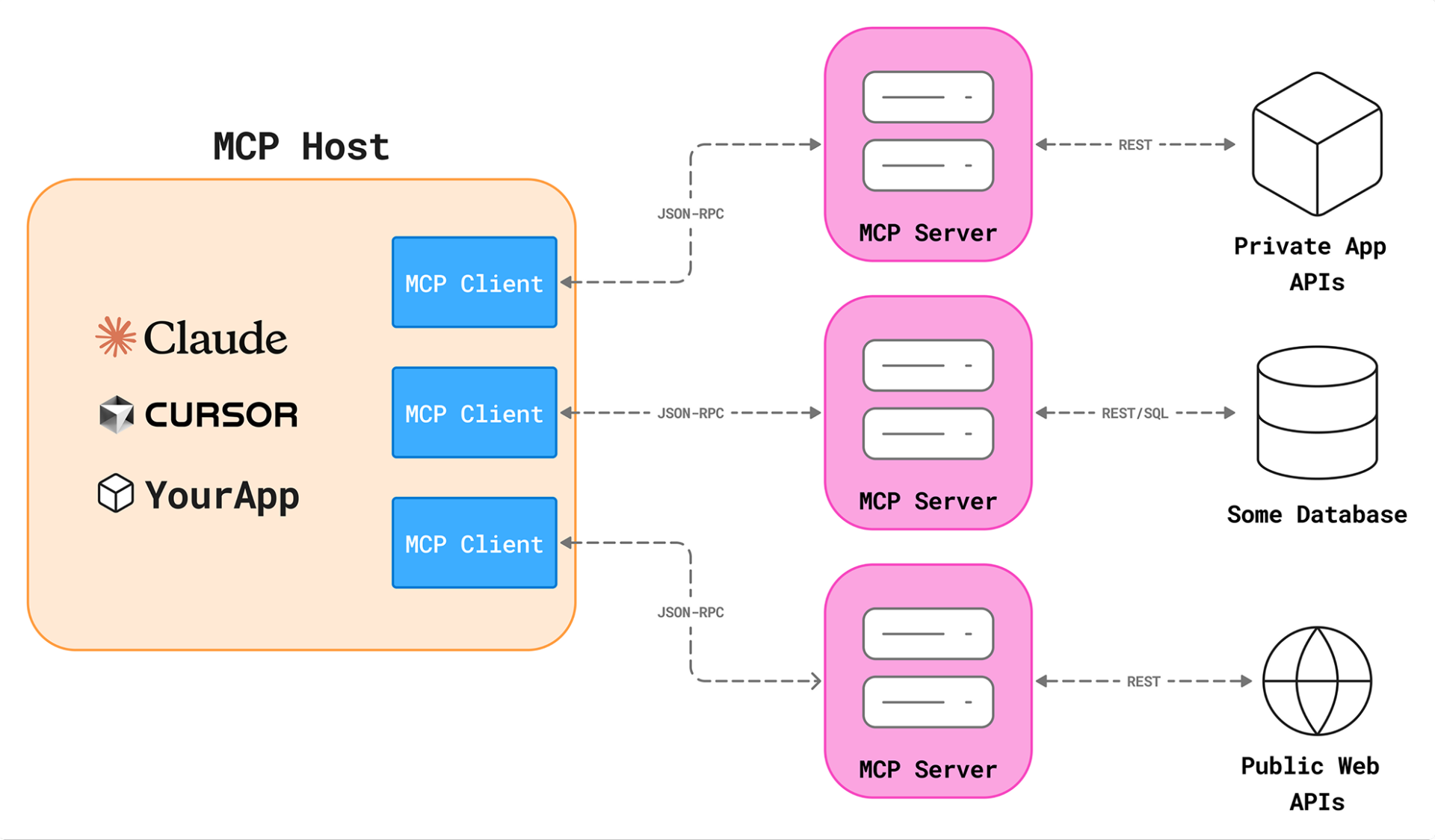
The MCP Architecture: Who Talks to Whom?
At the heart of MCP is a simple but powerful design:
- MCP Host: The AI application that runs the model (Claude Desktop, Cursor, VS Code, etc.)
- MCP Client: A connector inside the host that speaks MCP to a specific server
- MCP Server: A process that exposes tools, resources, and prompts
The official MCP architecture makes one design rule very clear:
One MCP client connects to exactly one MCP server.
But a host can have many clients, one per server.
The diagram represents this perfectly:
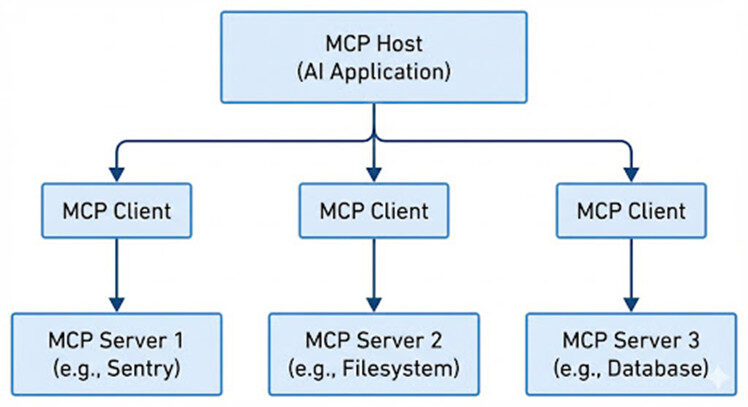
This modular design allows AI applications to mix and match capabilities like Lego blocks.
A server might give the model access to files, APIs, Sentry logs, SQL databases, your CRM, or anything else you want the model to interact with, all safely behind a protocol instead of custom scripts.
How an MCP Client Connects to an MCP Server
1. Client initiates the connection
When the host application starts, it boots up an MCP client and points it at a server. The client sends an “initialize” message to the server: saying, “Hello, I’m a client-version X, here are my capabilities.”
2. Server replies with its capabilities and metadata
The server responds with its own version information and what it supports: the tools, resources, prompts it offers, and any special features.
3. Client sends an “initialized” notification
After the handshake, the client sends a notification like “notifications/initialized” telling the server that the setup is complete and the session is ready for real work.
4. Client discovers what the server can do
The client asks the server: “What tools do you have? What resources? What prompts?” Using commands like tools/list, resources/list, etc. The server answers with lists.
5. Tool invocation and result flow begins
Once discovery is done, when a user or AI model decides a task needs to be done, the client sends a tool invocation to the server (e.g., “call tool ‘search_db’ with argument X”). The server executes and returns the results.
6. Session may end or stay open
When everything is done, the client or server can close the connection. Until then, the session stays open for multiple tool calls.
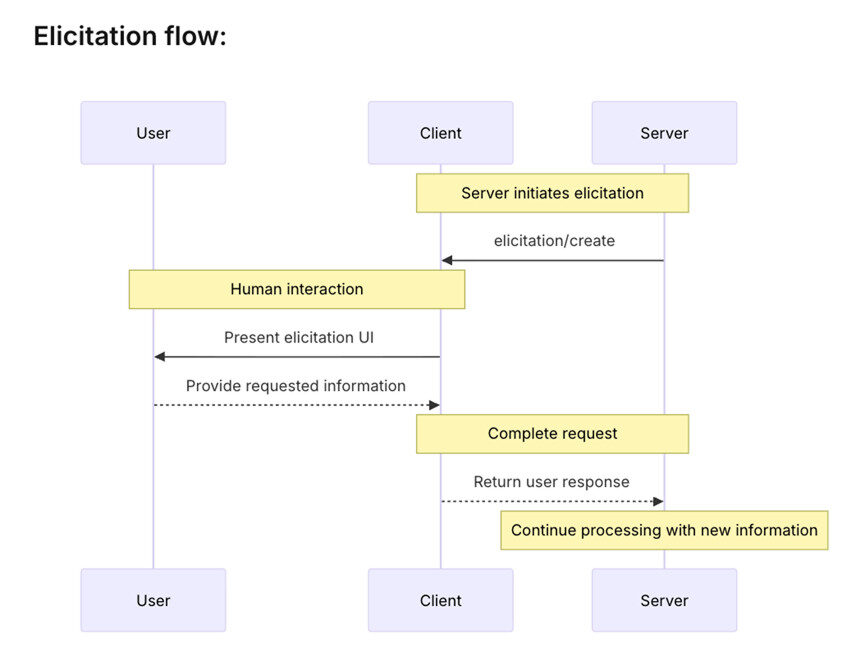
Once the host has identified which servers to use, the conversation between the client and server begins. First the host loads each server’s configuration (name, endpoint or command, transport type, environment variables). Next the client initiates a connection — whether via stdio for a local process, HTTP plus Server-Sent Events, WebSockets, or another supported transport. Then comes capability negotiation: the client and server exchange initialization data to agree which tools, resources, streaming features and error-handling behaviors are supported. After that handshake, the “normal operations” phase kicks in: the model asks the host to run a tool (for example “read file /notes/today.md”), the client sends the request, the server executes and streams back results or status updates, and the host delivers the structured output back to the model.
Local vs Remote MCP Servers
The protocol doesn’t care where a server runs. It only cares that the communication channel exists.
| Local Servers | Remote Servers |
|---|---|
| Run on your computer | Hosted on the cloud |
| Fast & Private | Accessible by teams |
| Perfect for filesystem, dev tools, personal databases | Can expose shared APIs & Great for production environments |
This flexibility is one of MCP’s biggest strengths.
MCP CLI vs FastMCP
While MCP CLI acts as a robust command-line utility for connecting to and exploring MCP servers, FastMCP is built on top of it, and makes the whole process far simpler. With FastMCP you skip most of the low-level setup and write just a few Python decorators to define tools, resources and prompts. The framework handles the protocol, transports and boilerplate for you, so your focus stays on business logic, not plumbing. According to its documentation, FastMCP 2.0 offers “the shortest path from idea to production” by abstracting complexity and letting Python developers build MCP servers in minutes.
Finding Ready-Made MCP Servers: The PulseMCP Directory
One of the most exciting parts of the MCP ecosystem is the explosion of ready-to-use servers.
The PulseMCP directory is like an App Store for MCP servers.
You can search servers for:
| GitHub | AWS documentation search |
| Jira | Logging tools |
| Google Calendar | Translation services |
| Sentry | Vector databases |
| Filesystem access | CRM integrations |
| SQL databases |
Each entry provides:
- Server name
- Setup instructions
- Config snippet you can paste into Claude Desktop or Cursor
- Capabilities (tools/resources/prompts)
The directory even has:
PulseMCP Server: A server that exposes the directory itself, so your AI models can search for more servers using tools.
It’s MCP composing MCP, very meta, very powerful. If users want to experiment with MCP without writing a single line of code, this directory is where they start.
Final Thoughts
MCP is quickly moving from “new protocol” to “default integration layer” for AI applications. The architecture is simple, the tooling is maturing, and the community is exploding with new servers.

