
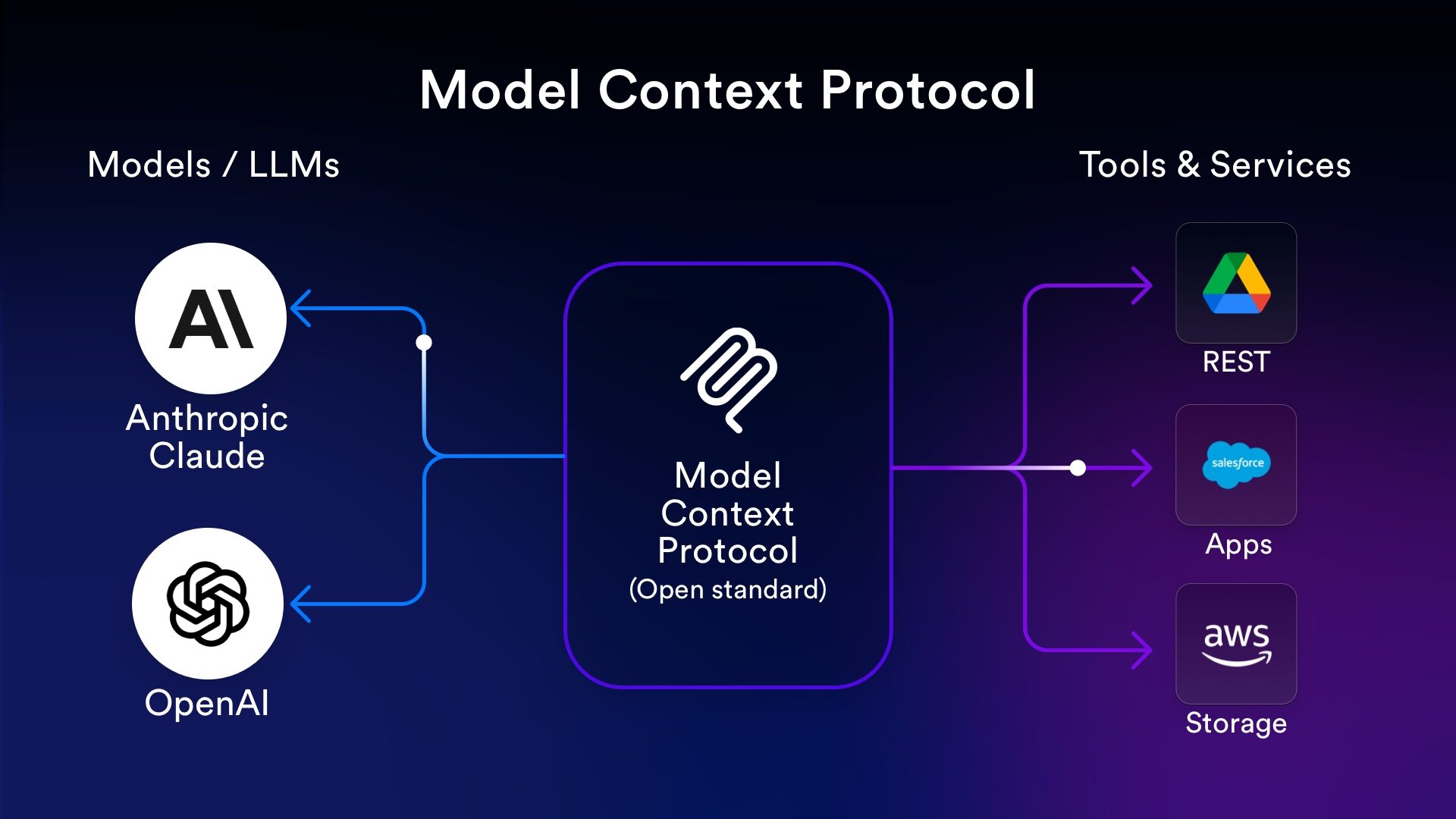
- Host/Client: This is typically our AI Chatbot or LLM application (such as Claude for Desktop, Cursor, or a custom-built tool). The MCP Client component is the necessary helper that handles the standardized communication with the Server.
- Server: This is any external tool or service that we want the AI to access, such as a weather service, a database, or GitHub.
Why Do We Need MCP: The Problem of Fragmentation
Before MCP, integrating AI tools with our existing business software was a complex and costly endeavor.
The Context Assembly Problem
AI models, like Claude, need context — all the relevant information — to generate useful responses and solve problems. In a professional environment, this context is scattered across many systems (e.g., code in GitHub, tasks in Jira, project documents in Google Drive).
To solve a simple problem, developers had to manually copy and paste information from various systems into the chatbot, acting as a “Human API” to assemble the required context. This process is time-consuming and fails dramatically as projects and codebases grow.
The Integration Nightmare
Initial attempts to automate this using “function calling” or “tools” created a new problem: the integration nightmare.
- If our company used three different AI tools (Clients) and wanted them to access ten different software services (Servers), we would need to write 30 unique pieces of integration code (3 x 10).
- Every time we added a new AI tool or a new service, custom code had to be written and maintained on the AI tool’s side to handle authentication, error codes, and data formats unique to that service. This required significant engineering time and cost.
MCP solves this by flipping the script: Instead of every AI Client needing custom code for every Server, the Server does the heavy lifting.
How MCP Works: A Standardized Approach
With MCP, the service providers (like GitHub or Slack) create one official MCP Server. This server handles all the complex tasks — such as authentication, business logic, error handling, and making sure the data is formatted correctly for the AI.
Our AI Client simply needs to know how to speak the standardized MCP language. It only requires configuration to connect, eliminating the need for our development team to write and maintain complex custom integration code on the Client side.
The Three Capabilities (Primitives)
MCP Servers offer the AI Host three main types of capabilities, often called “primitives”:
- Tools: These are specific functions or actions the AI can execute through the Server (with user permission).
- Example: A weather server might offer a
get_alertstool or aget_forecasttool. A GitHub server might offer a tool to create an issue.
- Example: A weather server might offer a
- Resources: These are static sources of structured data or knowledge that the AI can read.
- Example: Reading a specific repository’s README file, or fetching the schema of a database.
- Prompts: These are predefined guidelines or templates offered by the Server to help the AI Host interact with it more effectively.
- Example: A prompt template could ensure that when the AI creates a bug report using a
"Tool,"the report always includes the required fields like"Title,""Steps to Reproduce,"and"Environment".
- Example: A prompt template could ensure that when the AI creates a bug report using a
The Communication Flow
When an AI Host needs to use a capability during an operation:
- The AI Host first asks the Server for a list of available Tools, Resources, and Prompts (Capability Discovery).
- The User submits a query to the AI.
- The AI analyzes the query and determines which Tool(s) to use.
- The AI Client executes the necessary Tool call through the MCP Server.
- The Server executes the action and sends the results back to the AI.
- The AI uses those results (context) to formulate a clear, natural language response for the User.
Key Business Benefits of Adopting MCP
Adopting MCP provides significant advantages for development, maintenance, and security:
| Benefit | Description |
|---|---|
| Reduced Cost and Time | We eliminate the need to write custom integration code on the Client (AI Chatbot) side, as the Server handles the complexity. This saves development time and reduces engineering salary costs. |
| Simplified Maintenance | If a service (like Google Drive) updates its internal API, the corresponding MCP Server needs to be updated by the service provider. Our AI Client remains unchanged, eliminating maintenance overhead for us. |
| Increased Scalability | Our AI Host can easily connect to many Servers (services). We only need to add a single Client component for each Server, allowing the system to scale massively without added integration complexity. |
| Decoupled Architecture | MCP separates concerns. If communication with one Server fails (e.g., the GitHub Server is down), it does not affect the communication with other, separate Servers (e.g., the Slack Server). |
| Better Security | All credentials (like API keys) for multiple Server connections can be managed centrally in a single configuration file, making security auditing and management much simpler than tracking fragmented credentials across many custom integration files. |

