
Deprecated: Using null as an array offset is deprecated, use an empty string instead in /home/u876752588/domains/capria.vc/public_html/wp-content/plugins/jet-engine/includes/components/blocks-views/dynamic-content/manager.php on line 113
Google AI Studio, a powerful web-based platform, streamlines the development and deployment of AI models, especially Gemini models. Its user-friendly interface allows for seamless AI feature testing and integration with various Google services.
Recent updates have introduced advanced features that enhance model customization, multimodal experiences, and API access, making Google AI Studio an indispensable tool for developers, researchers, and AI enthusiasts. This article details the new features that make Google AI Studio more efficient and user-friendly.
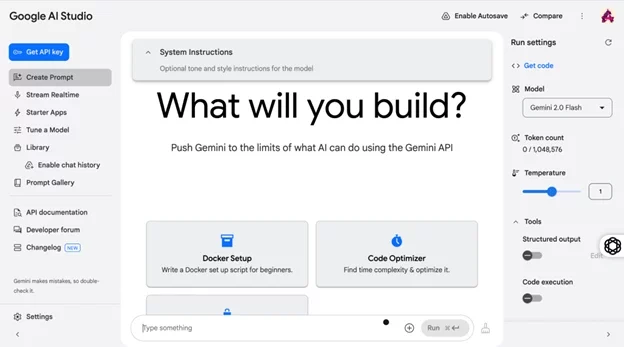
Lets explore all the main features of the platform one-by one:
Features
Left side panel
- Get API key:
-
- It is the starting point for the developers, API keys, used to connect to the Gemini, to serve the requests. APIs – useful to develop useful custom applications, Chatbots, and so on.
- Create Prompt:
-
- This option allows users to craft and refine prompts—text inputs that guide the AI’s responses or actions.
- You can input instructions (e.g., “Write a Docker setup script”) and optionally specify tone or style (e.g., formal, casual). The central workspace shows the prompt input area, where you can experiment with different phrasings to optimize AI output.
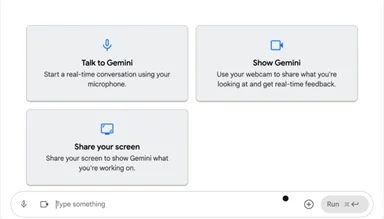
- Stream Realtime: This feature has 3 following options:
-
- Talk to Gemini: You can have a real-time conversation with Gemini using your microphone, like chatting with a friend.Helpfulness: Allows users to ask questions or get assistance hands-free, like troubleshooting a device or learning a recipe, making it convenient for everyday tasks. For example, a user could say, “How do I fix my Wi-Fi?” and get step-by-step guidance.Benefit: Saves time and makes technology accessible, especially for those who prefer speaking over typing.
- Show Gemini: Use your webcam to show Gemini what you’re looking at and get instant feedback or help.Helpfulness: Users can point their webcam at an object (e.g., a plant or a broken appliance) and get instant advice, like identifying the plant or suggesting a repair. It’s great for quick problem-solving at home.Benefit: Enhances learning and decision-making with visual context, ideal for hobbyists or curious individuals.
- Share your screen: Let Gemini see your computer screen to assist with what you’re working on, like explaining code or designs.Helpfulness: Users can show Gemini their computer screen to get help with tasks like writing emails, editing documents, or navigating software, making it easier to follow along with tutorials.
Benefit: Simplifies tech-related challenges, empowering users with personalized, real-time support.
Please try all these 3 features, it is fun! - Talk to Gemini: You can have a real-time conversation with Gemini using your microphone, like chatting with a friend.Helpfulness: Allows users to ask questions or get assistance hands-free, like troubleshooting a device or learning a recipe, making it convenient for everyday tasks. For example, a user could say, “How do I fix my Wi-Fi?” and get step-by-step guidance.Benefit: Saves time and makes technology accessible, especially for those who prefer speaking over typing.
- Starter Apps:
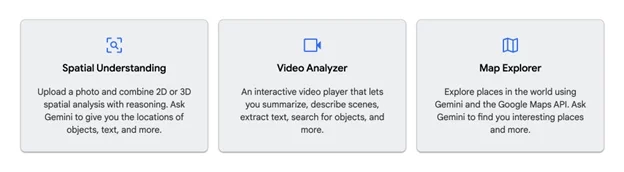
1. Spatial Understanding: Allows you to upload a photo and use Gemini to analyze 2D or 3D spatial data.
Helpfulness: This feature combines image analysis with reasoning to identify objects, text, or locations within the photo. For example, you could upload a picture of a room and ask Gemini, “Where is the table?” or “What text is on this sign?”Benefits: Ideal for tasks like home organization, identifying items in photos, or even assisting with augmented reality projects by pinpointing spatial relationships.2. Video Analyzer: It provides an interactive video player where Gemini can analyze and interpret the video content.
Helpfulness: You can upload a video, and Gemini can summarize it, describe scenes, extract text (e.g., subtitles), search for specific objects, or perform other analyses. For instance, you might ask, “What objects appear in the first 10 seconds?” or “Summarize this tutorial video.”
Benefits: Useful for reviewing footage, extracting key information from recordings, or creating educational content by breaking down complex videos into digestible insights.
3. Map explorer: Lets you explore the world using Gemini and the Google Maps API to discover interesting places.
Helpfulness: You can ask Gemini questions like “Find me a good coffee shop in Paris” or “Show me historical sites near me,” and it uses map data to provide tailored suggestions. The feature integrates real-world location data with AI reasoning.
Benefits: Perfect for travel planning, local exploration, or building location-based apps, offering personalized recommendations based on your interests.
Google for Developers
Google offers advanced tools to customize and optimize AI models for any project. This section gives you the adaptability to fine tune a model, choose the right Gemini variant, or modify response creativity, thereby pushing AI to its limits.
Tune a Model: Developers can fine-tune Gemini models to specialize in specific tasks. For example, a chatbot can be trained with medical data for a healthcare app. This fine-tuning ensures the AI delivers more accurate, context-specific responses, saving time and enhancing performance for niche applications.
Model Selection (Right Panel): Select the ideal Gemini model, such as the Gemini 2.0 Flash, to align with your project requirements. Choose a model that balances speed, cost, and accuracy while monitoring token usage to stay within API limits, whether you’re prototyping a real-time application or undertaking complex data analysis.
Temperature Control (Right Panel): Developers can control the AI’s creativity by adjusting the Temperature setting. At 0, the AI produces predictable outputs, while at 1, the responses are highly creative. This flexibility allows developers to tailor Gemini’s behavior to specific tasks, ensuring the perfect fit for any project. For instance, Gemini can be factual for coding tasks or imaginative for storytelling.
Costing: To refer Gemini Developer API pricing, please refer to this link.
Pros
- It is a platform that assists to get accessibility to BARD and other Google AI systems.
- You can use this platform even though you are not a coder. Instead of diving into the coding, you can adjust how an AI behaves, by designing and tweaking prompts.
- It focuses on prompt engineering and fine-tuning.
- User-friendly, Accessibility to customized AI solutions without coding, hence removing the barriers for the businesses to make their own product.
Cons
- It does not replace coding based highly specialized tech models / tasks. If you need to create complex, niche models, AI studio might be somewhat restrictive.
- Since it is a cloud-based platform, you will need a stable internet connection actively.
Who can use this
- Business owners, who want their own working AI systems within their organization.
- Content Creators – Assistance drafting and refining ideas
- Researchers – Conduct research to gain a deeper understanding of complex subjects by asking the AI to provide explanations and share the screen.
- AI enthusiasts – For the once who are curious for the working of LLMs
Final Thoughts
Google AI Studio provides developers, researchers, and AI enthusiasts with a user-friendly platform to build and deploy AI models. Its seamless integration with the Google ecosystem and continuous updates make AI development streamlined and accessible.
What are your thoughts on Google AI Studio? Have you tried it yet? Let us know!
See you next time!

