
Deprecated: Using null as an array offset is deprecated, use an empty string instead in /home/u876752588/domains/capria.vc/public_html/wp-content/plugins/jet-engine/includes/components/blocks-views/dynamic-content/manager.php on line 113

What is a Recruitment Agent?
Recruitment is one of the most crucial, time-sensitive and detail-oriented processes in any organization. When job openings attract hundreds of applications, manually reviewing each one becomes a tedious and inefficient task. To tackle this bottleneck, our development team has built a smart, AI-powered “Recruitment Agent”, a multi-agent system that automates the end-to-end hiring workflow with precision and speed, using Relevance AI and make.com on-the -shelf platforms.
The Traditional Process: Manual and Time-Consuming
Until recently, the recruitment process involved collecting candidate applications and were stored in a Google Sheet. Recruiters had to manually go through every application, evaluating resumes, reviewing LinkedIn profiles, and considering responses to behavioral questions. Based on these, a shortlist was prepared for interviews.
This process was highly repetitive, especially with a constant influx of applications. Manually screening hundreds of profiles was time-consuming, diverted attention from other important tasks, and introduced the possibility of human bias in the decision-making process.
The Solution: A Multi-Agent Recruitment System
Our team designed a Recruitment Agent using a low-code, no code platform that operates as a multi-agent setup, with each agent handling a specific task in the recruitment pipeline. At the heart of this system is the Project Manager Agent, which orchestrates and it breaks down the main task into subtasks and gives doable tasks to sub-agents:
The Sub-Agents at Work:
- Google Sheets Agent: The Agent has 6 tools: Get candidate email, get candidate name, create google sheet, insert into google sheet, get google sheet and get job id. Each of these tools can be used independently or in combinations depending on the prompt given to the agent.
- Asana Agent: This agent can retrieve the Asana task, get the candidate’s profile from each task, and/or mark any completed tasks as done.
- LinkedIn Agent: Retrieves the candidate’s LinkedIn profile, either from the application directly or by parsing the resume to infer it, if the link is not provided explicitly, and if not found, can search for a person with the same name and same university or school.
- Google Docs Agent: Retrieves the Google docs for JD file from Job ID.
- Scoring Agent: Scores each candidate based on resume content, LinkedIn insights, and behavioral question responses, against Job description using predefined prompt logic.
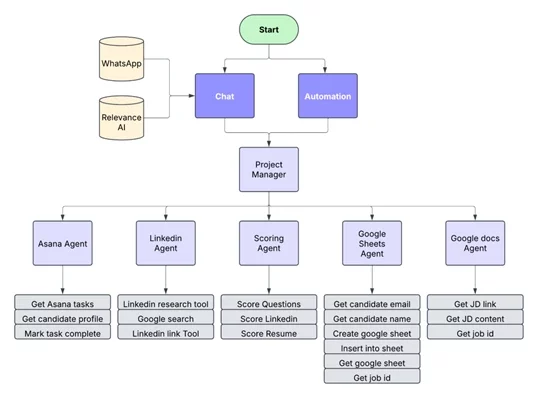
How It Works
The agentic system introduces two key innovations:
Job ID Linking: A unique Job ID is assigned to each job and candidate. This ID is used to connect candidate profiles to job descriptions and to record scores in Google Sheets.
Task-Specific Agents: Each agent is focused on a single, repeatable function, reducing complexity and increasing modularity.
- Job Creation: The recruiter must submit the job description using a Google Form, which saves it to a specific Google Drive folder. This process is necessary because the data is confidential and we cannot grant everyone access to the drive. Each job role is tagged with a unique Job ID, after which an asana task is assigned to add the job description to the website.
- Application Processing: As candidates apply from Capria’s career site, their application (resume, LinkedIn, behavioral questions) is stored in a Google Sheet, tagged with the same Job ID, this triggers relevance AI and the scoring of the job application begins.
- Evaluation & Scoring: The application, along with the Job ID is then passed to the Project Manager Agent agents, which:
- Gets Job description from Job ID using Google Docs Agent
- Both JD and Profile are passed to Scoring agent for Scoring
- The Scoring Agent:
- Compare resume content to job requirements
- Analyze behavioral question answers
- Score the LinkedIn profile for experience and fit
- Storing the results: The Project Manager delegates the output of Scoring Agent to Google Sheet Agent to store it in the spreadsheet for the specified Job ID.
- Result Usage: recruiters can sort the candidates based on relevance and take top candidates to review rather than going through all the 100+ applications.
Conclusion
This AI-powered Recruitment Agent saves recruiters hours of manual effort while ensuring high-quality candidate evaluation. With a modular, agent-based architecture, it scales effortlessly and adapts to changes in job roles, application formats, or evaluation criteria. It’s not just automation, it’s intelligent hiring at its finest.

