
Git is an essential tool for developers, helping them track changes, collaborate, and manage code efficiently. If you are new to Git or want to improve your skills, Simplilearn’s Git tutorial provides a structured learning path. This article breaks down key Git concepts from the tutorial, making it easy to understand and apply in real-world projects.
Git is a version control system that helps developers track, manage, and collaborate on code. Whether working alone or in a team, Git keeps track of changes, allowing you to undo mistakes, work on multiple features at the same time, and merge code seamlessly.
Why is Git Important?
- Tracks Changes – Saves different versions of code, so you never lose progress.
- Collaboration-Friendly – Allows multiple developers to work on the same project without conflicts.
- Backup & Recovery – Helps restore previous versions if something breaks.
- Branching & Merging – Enables developers to work on different features simultaneously and merge them later.
- Industry Standard – Used by companies and open-source projects worldwide.
Getting Started with Git
To use Git, you need to:
1️⃣ Install Git – Download and install Git from git-scm.com.
2️⃣ Configure Git – Set up your username and email using:
git config –global user.name “Your Name”
git config –global user.email “your.email@example.com”
3️⃣ Initialize a Repository – Start tracking a project using:
git init
4️⃣ Add & Commit Files – Stage and save changes:
git add filename
git commit -m “Initial commit”
5️⃣ Push to a Remote Repository – Upload your code to GitHub or GitLab:
git push origin main
Important Git Concepts
Understanding Git commands and workflows is key to mastering Git. The Simplilearn tutorial covers all major Git concepts, including:
1. Git Repositories
A repository (repo) is where Git stores project files and history. It can be local (on your computer) or remote (on GitHub, GitLab, or Bitbucket).
- Local Repo – Code stored on your computer.
- Remote Repo – Code stored online for collaboration.
2. Git Workflow: Staging, Committing & Pushing
Git follows a three-step workflow:
- Staging – Add files to be tracked (git add).
- Committing – Save changes with a message (git commit -m “message”).
- Pushing – Upload changes to a remote repo (git push).
This workflow ensures your code is saved and shared properly.
3. Branching & Merging
Branches allow developers to work on new features without affecting the main codebase.
- Create a new branch – git branch feature-branch
- Switch to a branch – git checkout feature-branch
- Merge a branch – git merge feature-branch
This makes team collaboration and feature development smoother.
4. Cloning & Pulling
Clone a repository – Download a copy of a remote repo:
git clone <repo-url>
Pull changes – Get the latest updates from a remote repo:
git pull origin main
This helps sync your local repo with the latest code.
5. Undoing Changes & Resetting
Git provides multiple ways to undo mistakes:
- Undo the last commit – git reset –soft HEAD~1
- Remove changes from a file – git checkout — filename
- Revert to an older commit – git revert commit-id
These commands prevent accidental code loss and errors.
Git vs GitHub: What’s the Difference?
Many beginners confuse Git with GitHub. Here’s the difference:
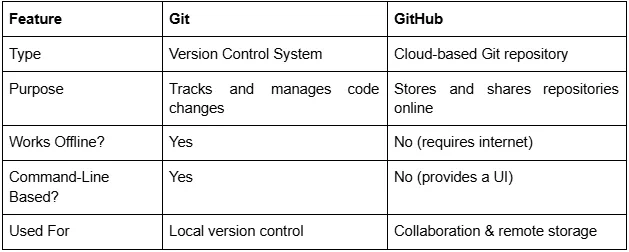
Git is the tool, and GitHub is the hosting platform. You can use Git without GitHub, but GitHub makes collaboration easier.
Final Thoughts:
Git is a must-have skill for developers, data scientists, DevOps engineers, and IT professionals. The Simplilearn tutorial breaks Git down into simple steps, making it easy to understand and apply in real-world projects.
If you are new to Git, start with:
- Basic commands – git init, git add, git commit, git push
- Branching & merging – git branch, git merge
- Undoing mistakes – git reset, git revert
Once comfortable, explore advanced features like rebasing, stashing, and Git hooks. Mastering Git boosts your efficiency, collaboration skills, and job opportunities in tech.

