
Deprecated: Using null as an array offset is deprecated, use an empty string instead in /home/u876752588/domains/capria.vc/public_html/wp-content/plugins/jet-engine/includes/components/blocks-views/dynamic-content/manager.php on line 113

What Are Thin Agents?
Thin agents are lightweight AI-powered services designed for specific, well-defined tasks instead of handling broad, complex reasoning. They are small, efficient, and require minimal infrastructure, making them ideal for focused AI tasks in larger systems.
For example, instead of using a large AI model to handle all customer support interactions, you can use a thin agent to classify support tickets and route them to the correct department. This approach ensures high efficiency and low operational cost without sacrificing performance.
Why Use Thin Agents Instead of Large AI Models?
Most AI models are huge, expensive, and require high computing power. Even when fine-tuned, large models demand costly GPUs, extensive storage, and significant engineering effort to scale. Thin agents avoid these problems by:
- Using smaller, quantized AI models that can run on regular CPUs.
- Fine-tuning models for specific tasks, making them more accurate and efficient.
- Keeping deployment simple, just like any microservice in an application.
Avoiding reliance on cloud-based LLM services, which can be expensive and slow for high-traffic applications.
Key Steps to Build a Thin Agent for a Specific Task
1. Choose a Small AI Model
Start with a lightweight LLM that can run on a CPU. For example, Llama 3.2 (1B parameters) is a great choice because it is small, fast, and easy to fine-tune.
2. Fine-Tune It for a Specific Task
Fine-tuning improves accuracy and efficiency. Instead of training a new model from scratch, use a framework like Unsloth to fine-tune an existing model for a specific use case.
For instance, if you’re building a support ticket classifier, train the model using real customer support tickets with structured inputs and outputs.
Example input:
“I received my phone, but the screen is cracked out of the box.”
Expected output:
json
CopyEdit
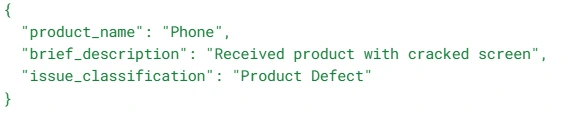
Fine-tuning with 20 minutes of training on a free Google Colab notebook is enough to create a reliable model for small-scale applications.
3. Compress and Optimize the Model
Once fine-tuned, quantize the model using GGUF format (optimized for CPU inference). Quantization reduces the model size to under 1GB, making it easy to deploy without specialized hardware.
4. Deploy It as a Rust Microservice
Instead of using heavy AI serving solutions, deploy the model efficiently using Llama.cpp (a fast inference library for AI models).
- Rust provides high performance and low memory usage, making it an ideal choice for a thin serving layer.
- Use Llama.cpp’s Rust bindings to wrap the model in an API that can handle requests and return AI-generated responses.
- Deploy the service like any other REST API, making it easy to integrate with your existing application.
5. Scale as Needed
Thin agents work just like any microservice. If traffic increases, you can scale horizontally (run multiple instances) rather than upgrading expensive hardware.
Benefits of Thin AI Agents
- High Efficiency – Runs on CPUs, avoiding the need for expensive GPUs.
- Cost-Effective – No reliance on cloud-based AI services, reducing API costs.
- Easy Deployment – Can be deployed as a simple microservice.
- Faster Inference – Optimized quantized models load quickly and respond fast.
- Task-Specific Accuracy – Fine-tuned models outperform generic AI models for specialized tasks.
Final Takeaway
Thin AI agents allow developers to integrate AI into applications without the complexity of managing large AI models. If you need an AI model to solve a specific problem, use a small, fine-tuned, and optimized model instead of a massive LLM.
With Unsloth for fine-tuning, Llama.cpp for inference, and Rust for deployment, you can create cost-efficient, high-performance AI services without the burden of massive infrastructure.

